BackupCare+Back up your Android phone to your PC. Every day, automatically, without the cloud.

Install the program on your PC and the app on your phone, scan the QR code, and from then on your photos, videos, WhatsApp, SMS, contacts and apps are saved at home every day. No cloud and no subscription.

7-day free trial · The PC program is always free

Photos and videos
WhatsApp
SMS, calls and contacts
Apps
Automatic daily backup

Why BackupCare+: Android backup to PC done right

Made for people who don't want to think about it: no setup, no cable, no cloud. Your memories stay at home.

Photos and videos to your PC, automatically, over Wi-Fi

Your phone backs itself up to the PC at the time you choose. After the first backup it copies only new or changed files. If you are out or the PC is off, it catches up as soon as both are back on the same network.

WhatsApp backup to PC, past days included

Your PC keeps one copy for every day, not just the latest. Put any of them back on the phone with a guided restore and, with the 64-digit key, read and search your chats on the PC.

Restore to the right place

Lost a photo or a document? It goes back to the same folder, with its original date. You first see how many files are missing, and files already there are left untouched.

Apps too

Saves the installation files of the apps you choose, with their photos and videos. On a new phone you reinstall them from the PC, one after another.

No duplicates

Finds photos and files saved more than once and sets them aside without deleting them. You choose whether to keep the original, the newest or the smallest.

Private, at home

Phone and PC talk only over your home Wi-Fi, on an encrypted connection. Your files never go through the Internet or our servers. No subscription.

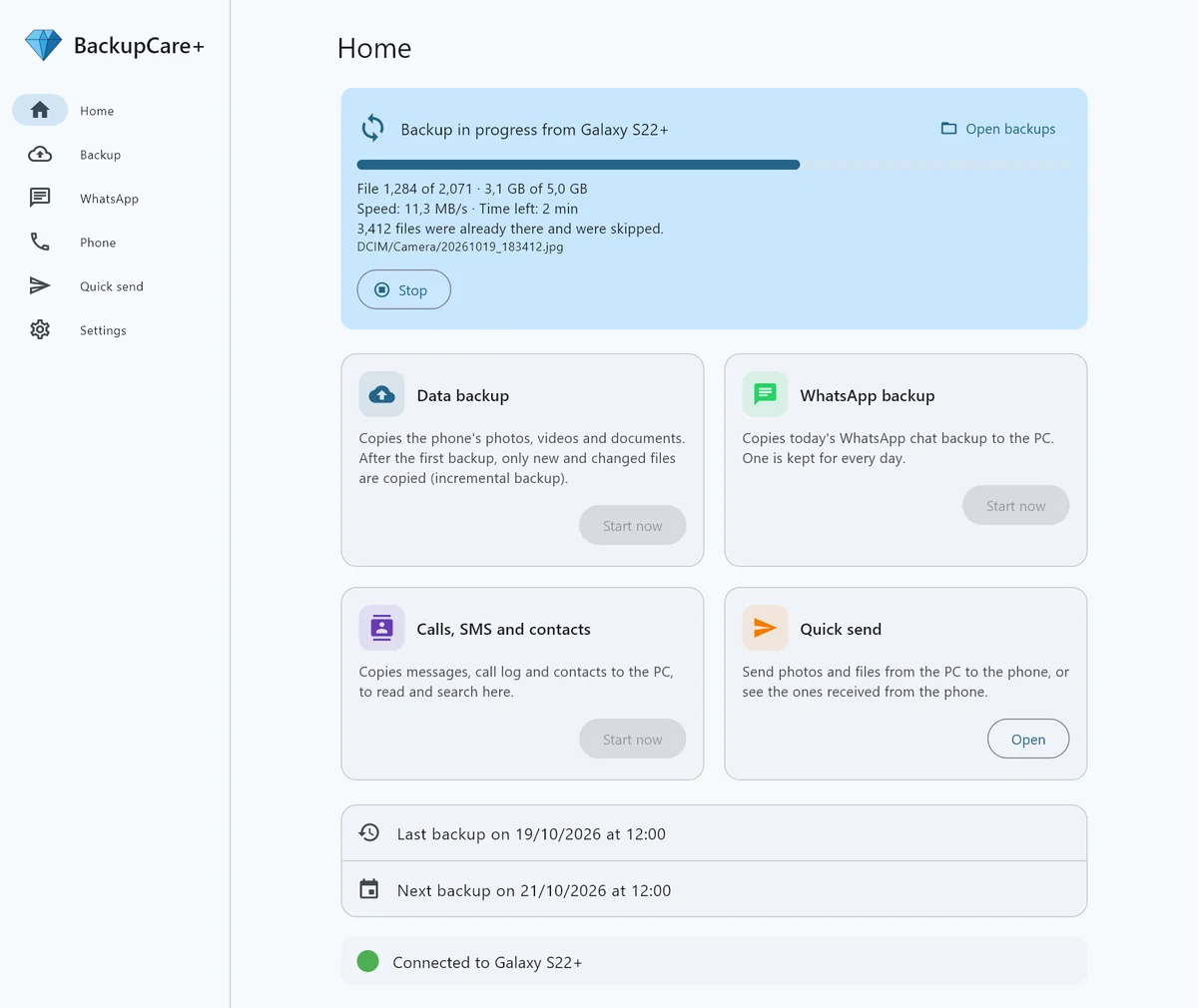
The BackupCare+ Windows program during a backup: progress bar, speed and estimated time
On the PC you watch the backup arrive: how many files, how fast and how long is left.
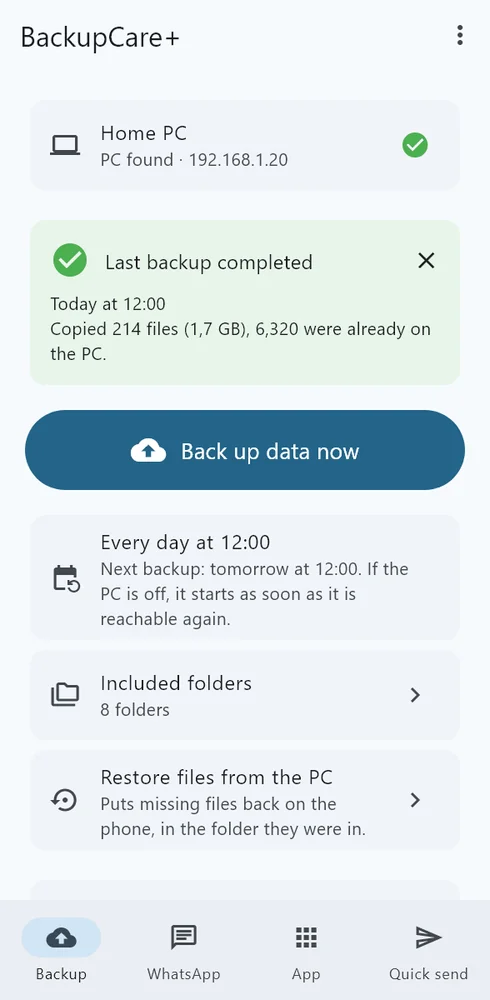
The BackupCare+ app on the phone: last successful backup and next automatic backup
On the phone: one button, and the time of the next backup.

Recover WhatsApp chats from a past day

Google keeps only the latest chat backup: if something goes wrong today, yesterday's copy is gone. BackupCare+ keeps one for every day on your PC.

If you deleted a chat or some photos by mistake, pick the right date and put that backup back on the phone with the guided restore.

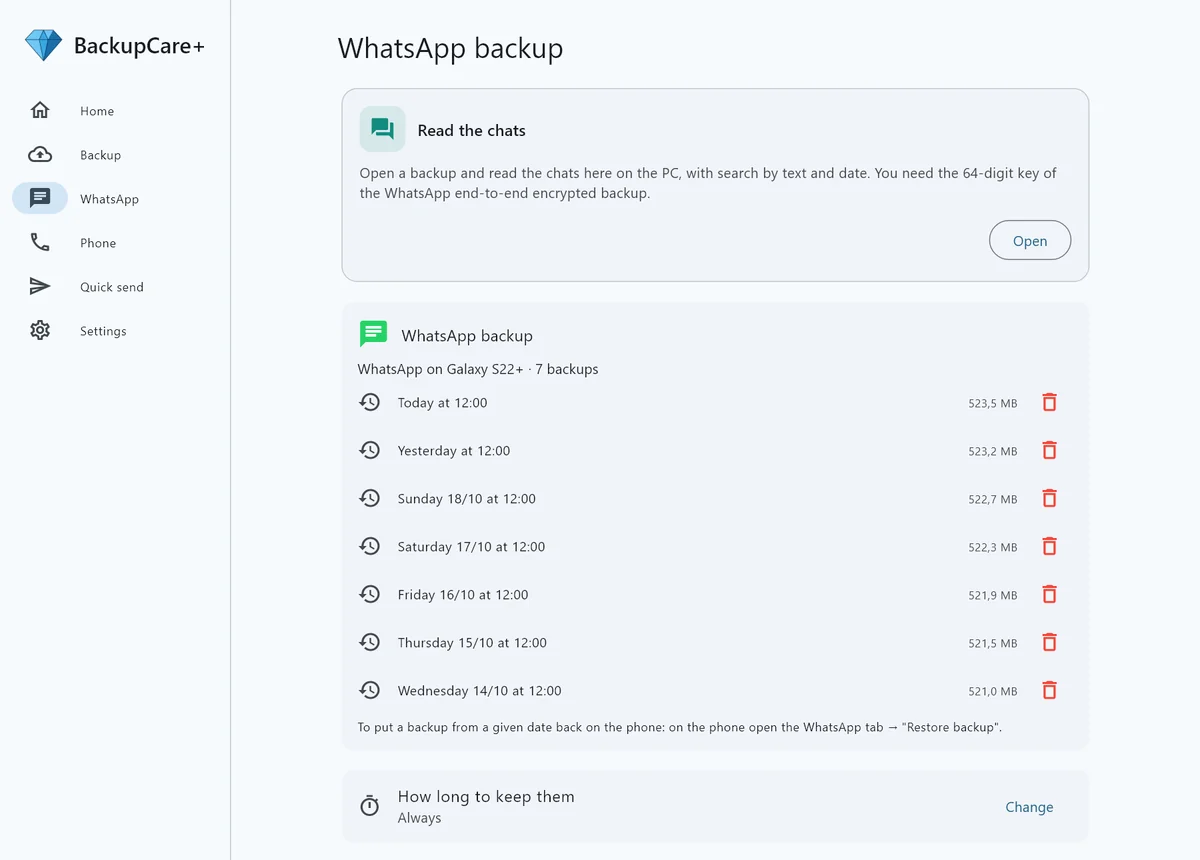
The list of WhatsApp backups saved on the PC, one for every day, with date and size
A new WhatsApp backup every day, with date and size. You decide how long to keep them.

An alternative to Google Drive and Smart Switch: what is different

Google and Samsung already offer a backup, and that is worth saying. Here is where BackupCare+ is different.

Runs by itself every day

Google
Yes
Smart Switch
No
by hand, with a cable
BackupCare+
Yes
over Wi-Fi

Copies stay at home, not on the Internet

Google
No
Smart Switch
Yes
BackupCare+
Yes

No storage subscription

Google
No
15 GB free, then paid
Smart Switch
Yes
BackupCare+
Yes
uses your PC disk

Works with every Android phone

Google
Yes
Smart Switch
No
Galaxy only
BackupCare+
Yes
Android 11 or later

One WhatsApp backup for every day, not just the latest

Google
No
Smart Switch
No
BackupCare+
Yes

Read and search WhatsApp chats on the PC

Google
No
Smart Switch
No
BackupCare+
Yes
with the 64-digit key

SMS, calls and contacts viewable on the PC

Google
No
restore only
Smart Switch
No
restore only
BackupCare+
Yes

Never deletes anything on the PC

Google
—
Smart Switch
—
BackupCare+
Yes
an archive, not a mirror

It is not a contest: if you also want a copy away from home, you can keep Google's backup alongside BackupCare+. With us you get an extra complete copy at home, which you can open and browse whenever you like.

Comparison of standard features as of October 2026. Google and Samsung may change their services; if you spot a mistake tell us and we will fix it.

Back up Android to your PC in three steps

Download, scan the QR code and the backup starts by itself.

1

Install on your PC

The program for Windows 10 and 11 is free and sits next to the clock, ready to receive.

Download for Windows

Version 1.0.8 · 28 Oct 2026

2

Install on your phone

App for Android 11 or later. It guides you step by step through the permissions it needs.

Download for Android

Version 1.0.8 · 28 Oct 2026

3

Scan the QR code

Done: from then on the backup runs by itself every day. You get a 7-day free trial of the backup.

Pay once, and it is yours

No subscription and no expiry. The PC program is free: you only buy a license for the phone, or for the office that receives clients' chats.

2026 EDITION

BackupCare+

Lifetime license · 2026 edition

Pay once, no subscription. The license never expires: the automatic backup of your Android phone to your PC is yours to keep.

30 € one-time payment
  • Automatic daily backup over your home Wi-Fi
  • Photos, videos, documents, music and downloads
  • WhatsApp backup and restore, with chats readable on the PC
  • SMS, call log and contacts
  • Quick transfer of photos and files between phone and PC
  • Free Windows program
  • Fixes and compatibility updates included until 31 December 2027, and in any case until the next edition is released
  • Moving to a new phone included

Secure payment with Stripe. You receive the license by email.
Try it free for 7 days before buying · Terms of sale (Italian)

FOR PROFESSIONALS

BackupCare+ Pro

For professionals · Lifetime license for one PC

For law firms, unions and advice centres: open and read on your PC the WhatsApp chats your clients send you with BackupCare+, complete with photos, voice notes and videos.

129 € one-time payment per PC
  • Opens .bkchat files: one chat per file, password protected
  • Text, photos, voice notes, videos and documents in a single file
  • Search by word, name and date within the conversation
  • Your client exports from their own PC: no phones to hand over
  • Files stay encrypted: they open only with the client's password
  • Works without an Internet connection
  • Fixes and compatibility updates included until 31 December 2027, and in any case until the next edition is released

Secure payment with Stripe. You receive the license by email.
Try it free for 7 days before buying · Terms of sale (Italian)

For law firms, unions and advice centres

When a client needs to show you a WhatsApp conversation, you usually get scattered screenshots or a phone to scroll through. With BackupCare+ the client exports the complete chat from their PC into a single password-protected file, and you open it on your office PC just like in WhatsApp.

One protected file per chat

Text, photos, voice notes, videos and documents in a single .bkchat file, encrypted with the password the client chooses.

Read and search

The conversation as on the phone, with search by word and date. No phone to keep at the office.

Confidential

The file never goes through us: send or receive it however you like, and without the client's password nobody can open it.

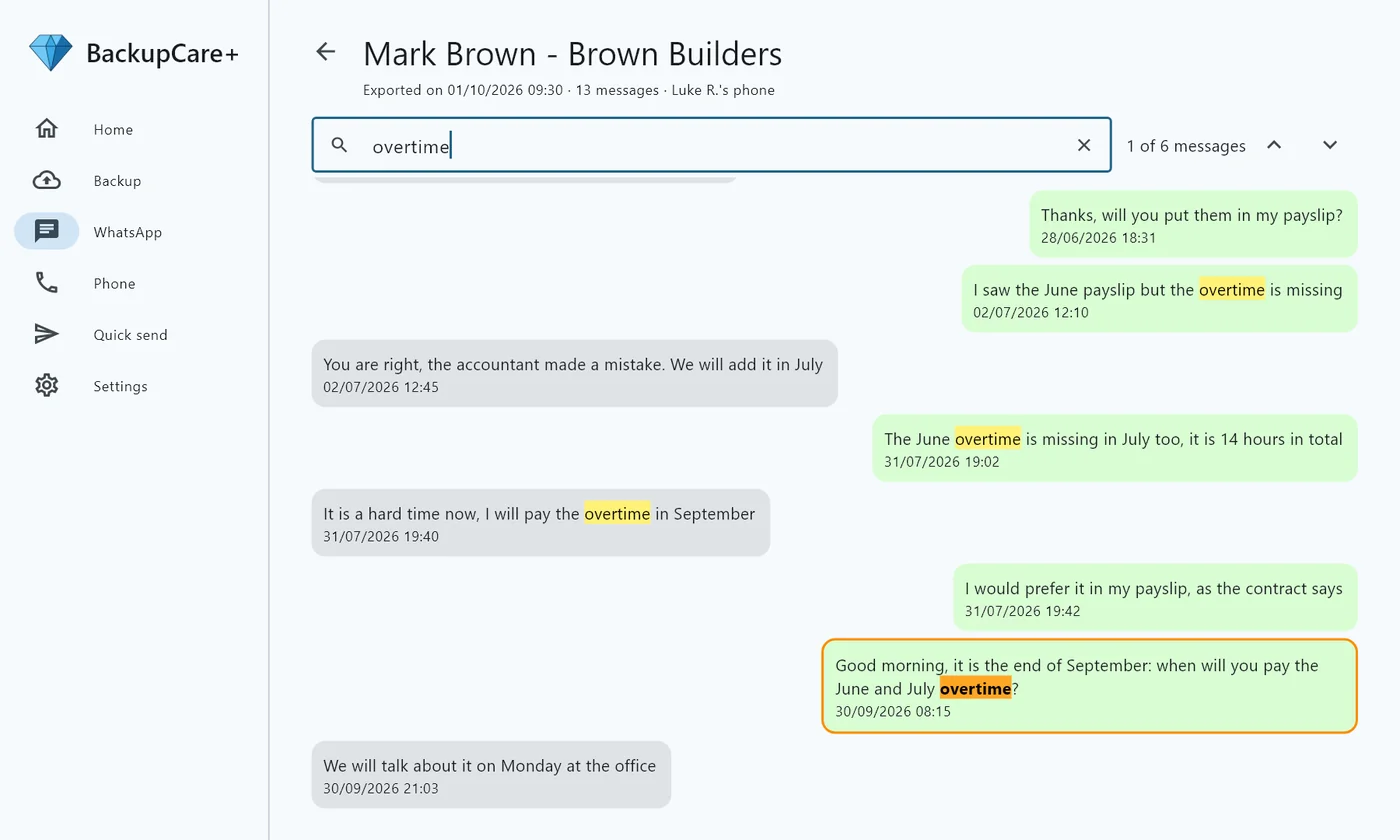
A WhatsApp chat opened on the PC with the Pro License: the searched word is highlighted in every message
Example with a made-up chat: search a word and you immediately see every message that mentions it, with arrows to jump between them.

The Pro License is activated in the PC program (one license per PC). For several workstations or offices contact us. The exported file is a copy for reference: it does not replace a certified forensic copy.

Frequently asked questions

How do I back up WhatsApp to my PC?

WhatsApp saves a copy of your chats on the phone by itself every night. BackupCare+ copies it to the PC every day over Wi-Fi and keeps one for every day, not just the latest. A guided procedure puts any of them back on the phone.

Can I recover WhatsApp chats deleted before I installed BackupCare+?

No: BackupCare+ restores only the backups it saved on your PC. If you did not have it yet, try WhatsApp's Google Drive backup (restored by reinstalling WhatsApp) or the local copies WhatsApp keeps on the phone for a few days. From the day you install BackupCare+, every day stays saved on your PC.

Can I back up Android without Google Drive?

Yes. BackupCare+ saves photos, videos, WhatsApp, SMS, calls, contacts and apps to your PC's disk over your home Wi-Fi, without going through the Internet. You can keep Google's backup as well: the two work side by side.

How do I transfer photos from my phone to my PC without a cable?

Install the program on the PC and the app on the phone, then scan the QR code. The first time, all photos and videos move to the PC over Wi-Fi; after that only new ones, automatically. If you lose one, it goes back to its original folder with its date.

Do I have to pay every year?

No. You pay once and the license is yours: it does not expire, does not lock and has no renewals. Fixes for the 2026 edition, including those for changes in Android and WhatsApp, are free until 31 December 2027, and in any case until the next edition is released. After that the app keeps working as before.

What if Android or WhatsApp change one day?

Fixes are free until 31 December 2027, and in any case until the next edition is released. If a major change comes later, a new edition will be released: existing license holders get it at a reduced price, and upgrading is never required. Anyone who buys in the 3 months before a new edition gets it free.

What if I'm not home or the PC is off at backup time?

No problem: the backup starts as soon as phone and PC are back on the same Wi-Fi, even days later. If too many days pass without a backup, the phone warns you. You change the time and days in the PC Settings.

Can I try it before buying?

Yes. The PC program is free and the app includes a 7-day free trial: backup of photos, WhatsApp, SMS and apps. Exporting protected chats for lawyers and unions requires the license. After the trial you need the license to keep going.

Is the license valid for several phones? What if I change phone?

One license covers one phone at a time, even if it backs up to several PCs. If you change phone (for example from a Galaxy S22 to an S24), install BackupCare+ on the new one, enter the same code and tap "Move here": the license moves to the new phone for free. It can be moved once a month.

Do my files go on the Internet?

No. Phone and PC exchange files only over your home Wi-Fi, on an encrypted connection. We use no cloud and never see your data.

Does it work with iPhone?

No, BackupCare+ is designed for Android phones (version 11 or later) and PCs with Windows 10 or 11.

Windows or the phone warn me during installation: is that normal?

Yes, it happens with new programs installed outside the stores. On Windows click "More info" and then "Run anyway"; on the phone allow installation from this source.

Does the WhatsApp backup include today's messages?

BackupCare+ copies to the PC the latest backup WhatsApp makes by itself on the phone, usually at night: messages received afterwards go into the next day's backup. If you need the most recent copy, first open WhatsApp > Settings > Chats > Chat backup > Back up, then tap "Create backup" in BackupCare+. If the WhatsApp backup is more than 24 hours old, the app suggests it by itself.
Use BackupCare+ only on your own phone or on a phone whose owner has given consent: copying data from someone else's device without permission is against the law.

WhatsApp is a trademark of WhatsApp LLC (Meta Platforms, Inc.); Android is a trademark of Google LLC; Windows is a trademark of Microsoft Corporation. BackupCare+ is not affiliated with, sponsored or endorsed by these companies: the names are mentioned only to indicate compatibility. Exported chats are reference copies and do not replace a certified forensic copy. Use of the program is governed by the contract and terms of sale (Italian).

Questions?

Write to info@backupc.it: we answer in English and Italian.